Ok so you have this thing that you want to do and it involved stuff. And when you do that stuff you want something to happen. And when that happens you want to know that it happened and tell someone, “Hey I did stuff and something happened.” That, in essence, is what Concurrency Mode is for provided all this had to do with the Entity Framework and updating records.
Concurrency Mode allows you to make sure that nothing has changed in the database before or during the current save. Basically it checks the database to make sure the record being updated still is in the same condition it was when you loaded it to the context. If it isn’t, then an exception is thrown. (Maybe not the way I would prefer handling this situation, but hey I don’t work for the M) How do I get this to happen? Well it’s a pretty easy change, though it has an annoying short coming. First the change.
Open up the model browser (IE double click on the .edmx file) and select any property on any entity. Then view the properties.
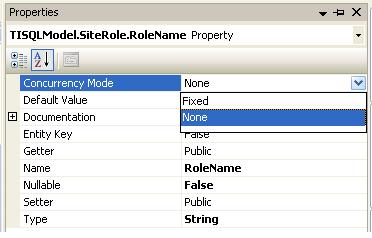
And in the image you can see that there is a property surprisingly named “Concurrency Mode” and there are two options: Fixed and None. Guess which one I’m talking about in this post.
Now if I just left you with that, you’d have everything you need to know and you wouldn’t waste the next minute you’re going to waste on my findings. Good thing you aren’t smart enough to walk away.
You might wonder how the Entity Framework is able to do that, after all even I did and as we all know, I am genius.
Say you have a User entity where the UserName and MainEmail properties had Fixed Concurrency. Now suppose the old values of these were ‘oldValue’ and you just changed them (UI Side) to ‘HIHIHI’. At this point you want to save the changes. Well if you use profiler and a watch as it saves, you’ll see something like this:
exec sp_executesql
N'update [TIDBA].[TI_USER]
set
  [MainEmail] = @0,
  [UserName] = @1
where
  ((([UserID] = @2)
and
  ([MainEmail] = @3))
and
  ([UserName] = @4))
',N'@0 nchar(6),
@1 varchar(6),
@2 int,
@3 nchar(6),
@4 varchar(6)',
@0=N'HIHIHI',
@1='HIHIHI',
@2=1,
@3=N'oldValue',
@4='oldValue'
Which cleans up into:
update [TIDBA].[TI_USER]
set
  [MainEmail] = 'HIHIHI',
  [UserName] = 'HIHIHI'
where
  ((([UserID] = 1)
and
  ([MainEmail] = 'oldValue'))
and
  ([UserName] = 'oldValue'))
As you can see, the Entity Framework matches the originally loaded values against the database (Only on Fixed Concurrency properties) and sees if it can find a record. If it can’t, it means those values have changed. The exception follows.
Now besides the exception part (A bit much but can be handled), the only annoying thing is that you have to do this property by property. I don’t see a way yet to make it standard for the entire entity. Such is life.
Hi, maybe you can help, I posted this comment to MSDN (http://social.msdn.microsoft.com/Forums/en/adodotnetentityframework/thread/e6a8bd4b-b4ad-4459-904b-db21f2e0e5ab) but haven’t got a response yet:
I have been keeping an eye on EF4 performance using SQL Query Profiler. I noticed that when I expect to save one object to the database, it is actually saving that object plus all related objects.
My Entities are named User, Session, and Workstation. The User and the Workstation tables each have 2 columns (the primary key and a Timestamp column) with Concurrency Mode=Fixed, since these Entities can be edited in a form. The Session object does not have any Concurrency Mode set on any columns. The Session object contains 2 foreign keys, one each to User and Workstation. At the time the user starts the software, I create the Session entity and relate it to the User and the Workstation where they logged in. I set the OnlineTime in the Session to DateTime.Now.
When I call SaveChanges on the Context, all 3 Entities are saved, even though I never changed the User or Workstation objects. I just created a Session object that was linked to a User and a Workstation. This causes the Timestamp column to increment on both the linked User and Workstation records, which is not what I want at all.
Furthermore, when the user closes the app, I just change their OfflineTime in the Session object to be DateTime.now and again call context.SaveChanges(). Again, all 3 objects are updated in the database. This 2nd time is even more egregious because I have only touched a single property in the Session object, not modifying relationships at all, and it still increments the Concurrency Mode=Fixed timestamp columns in the linked User and Workstation objects, and reads back the new values during the SaveChanges operation.
How can I change this behavior so that only entities that are actually modified, are saved to the database. Creating a relationship between the Session and User/Workstation Entities should not cause the User/Workstation Entities to be re-saved to the database because all the Foreign Keys reside within the Session object.
Thanks in advance for your help. I will be happy to provide a simple sample solution that demonstrates this issue.
My environment is Visual Studio 2010 Pro Trial and MS SQL Server 2005.